
Lurnia: AI Language Tutor
AstronexEducation
4.538.00 Reviews
- Version
- 1.6.0
- Installs
- 1.00M
- Age Rating
- Everyone
Screenshots



Our Review of Lurnia: AI Language Tutor
 Analysis by Appyee
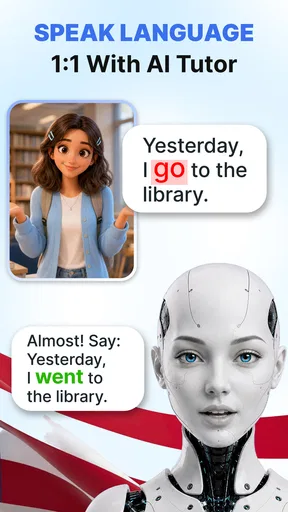
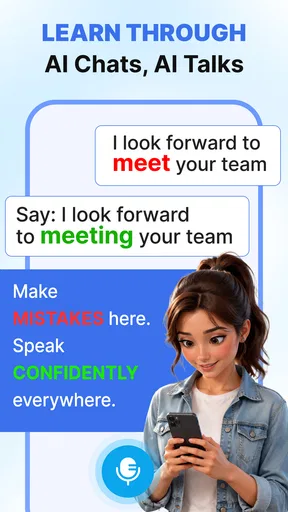
I tried Lurnia: Learn Language with AI as an education app built around speaking practice rather than silent memorization. Its main idea is simple: you interact with an AI tutor, hold realistic conversations, and receive feedback while you practice. That makes it feel closer to a low-pressure rehearsal partner than a traditional course full of isolated vocabulary cards.
That distinction matters most in a household where one phone or tablet is shared. A parent may want to practise travel phrases, a teenager may be preparing for a conversation, and another family member may simply want to become less nervous about speaking. Lurnia can fit those moments because it is free to start, rated for Everyone, and available from Android 7.0 onward. Still, I would treat it as a personal practice tool rather than a fully managed family-learning system. The app’s value depends on how deliberately each person uses it.
How Lurnia feels in a shared household
My first useful test for an app like this is not whether it can produce impressive sentences. It is whether someone can pick it up after dinner, practise for a few minutes, and understand what to do next. Lurnia’s conversation-first approach is well suited to that short session. You can use it when you have a specific goal in mind instead of committing to a long lesson.
A realistic household example would be a family getting ready for a holiday. One person could practise ordering food, another could rehearse checking into accommodation, and a student could use the same general idea to build confidence before speaking in class. The important benefit is not just learning a phrase. It is getting used to responding when the wording changes slightly, which is where many textbook exercises stop being useful.
I also like the fact that the app’s central interaction is easy to explain to another person: speak, receive feedback, try again. That makes it less intimidating than asking a family member to act as a language coach. A relative who already speaks the target language may be helpful, but practising with someone you know can also feel embarrassing. An AI tutor removes some of that social pressure.
There is a trade-off, though. A shared device can make practice convenient, but convenience is not the same as separate learning history. I would not assume that one person’s conversations, progress, or preferences are automatically isolated from another person’s. Before several people use the same device, I would check what the app shows at launch and how it handles sign-in. If the household wants clean individual records, each person should use their own account boundary whenever the app offers one.
Short sessions work better than vague practice
Lurnia is easiest to use when I give the session a job. “Learn Spanish” is too broad to guide a ten-minute practice period. “Practise asking for directions” is much better. A focused situation gives the conversation a natural endpoint and makes the feedback easier to apply.
One technique I found useful is to repeat the same situation in two passes. In the first pass, I answer without stopping to chase perfection. In the second, I deliberately slow down and correct the parts that caused trouble. This turns the AI conversation into a small rehearsal loop instead of a one-off exchange. It is a particularly practical workflow for a shared tablet, because another family member can use the device immediately afterward without needing a long lesson setup.
Another useful habit is to keep a tiny list of phrases that caused hesitation. I would not copy every correction. I would choose two or three expressions that I genuinely expect to use, then bring them back into the next conversation. This prevents feedback from becoming a wall of information. The app can point out issues, but the learner still has to decide which corrections deserve attention.
What to settle before several people use it
The app is developed by Astronex and currently sits at version 1.3.0. In a single-user situation, that may be all the practical information you need. In a household, I would spend a little more time on setup because shared use creates different expectations.
First, decide whether the device is acting as a personal learning space or a communal one. If it is personal, leave the app in one learner’s language and routine. If it is communal, agree that each user will identify themselves before starting. That sounds obvious, but it prevents one person’s practice from being mistaken for another’s.
Second, avoid treating the app as a substitute for parental supervision simply because its content rating is Everyone. That rating makes it broadly suitable as a category of app, but it does not tell a parent how a particular child will use an AI conversation. Younger learners may need help choosing suitable topics, understanding corrections, and deciding which information should never be shared in a chat.
Third, consider the difference between a free download and the full cost of continued use. Lurnia is free, while optional in-app purchases range from $2.49 to $84.99 per item. That is a wide span, so I would not hand the device to a child with unrestricted purchasing access. A parent should review the purchase settings on the device and explain clearly whether the app is being used only at no cost or whether paid options are allowed.
This is one of the most important practical boundaries for a shared device: the learner may be ready for language practice without being ready to make purchase decisions. Keeping those two questions separate avoids an awkward surprise later.
Keeping practice coordinated without turning it into homework
Coordination works best when it stays light. I would not ask every family member to follow the same lesson or compete over who improves faster. Instead, each person can choose a different scenario and share one useful phrase at the end of the day. That creates a small amount of accountability without making the app feel like another chore.
For a parent and child, a good arrangement is parallel practice. The adult might rehearse travel conversation while the child practises introductions or classroom language. Afterward, they can compare what felt difficult rather than comparing scores or judging pronunciation. This keeps the focus on communication and makes it easier for a nervous learner to admit that a particular exchange was confusing.
For siblings, I would set a simple rule: do not interrupt another person’s speaking session unless they invite you. AI practice can feel private even when it happens in a room full of people. Respecting that small boundary matters, especially for learners who are still uncomfortable hearing their own voice in another language.
There is also a practical scheduling advantage to short conversation practice. A shared device does not need to be occupied for a long block of time. One person can use it while waiting for dinner, another can practise before bed, and a third can take a turn during a commute if the device travels with them. The limitation is that coordination remains manual. Lurnia should not be treated as a household dashboard unless the app itself clearly provides that kind of organization.
Feedback is useful, but it is not the same as a teacher
The strongest part of Lurnia’s concept is immediate response. When I practise with a book, I can understand a sentence without proving that I can produce it. With an AI tutor, I have to attempt an answer and deal with the next turn. That exposes gaps that passive study can hide.
Still, instant feedback needs interpretation. A correction may be technically useful but not equally important for every learner. If the goal is to survive a holiday conversation, being understandable and knowing the key expressions may matter more than polishing every small grammatical detail. If the goal is schoolwork or formal writing, spoken conversation alone will not cover everything.
I would also avoid assuming that an AI response is automatically the final authority on nuance. Languages contain regional differences, levels of politeness, and context that can be difficult to reduce to one correction. When a phrase feels strange or especially important, I would check it against a trusted course, teacher, or native-speaking source rather than memorizing it blindly.
That limitation does not cancel the app’s usefulness. It simply defines the right role for it. Lurnia is a practice partner and feedback tool, not a replacement for a structured curriculum, a classroom, or a human teacher who knows the learner’s long-term needs.
Who in the family is likely to benefit most
I think Lurnia is a strong match for adults who already know some basics but avoid speaking. The AI setting gives them a place to make mistakes without waiting for a scheduled lesson or imposing on a bilingual friend. It is also a good fit for travellers who need situational confidence more than an exhaustive grammar course.
Older children and teenagers may benefit when an adult helps them turn the app into a specific routine. For example, a student could practise a short introduction, then repeat it until the wording feels natural. The adult does not need to correct every sentence; simply asking the learner to explain what they were trying to say can reveal whether the problem was vocabulary, pronunciation, or uncertainty about the situation.
Beginners can use it too, but I would watch for frustration. Conversation is demanding when a learner has very few words available. If a child or adult keeps freezing because the starting vocabulary is too small, a more structured beginner course may be the better first step. Lurnia becomes more valuable once the learner can form at least simple responses and benefit from back-and-forth practice.
It is less suitable for someone who wants a complete academic program with carefully sequenced units, written assignments, exam preparation, and a teacher reviewing progress. It is also not the best choice for a person who dislikes speaking practice altogether. The app’s central strength is exactly the activity that such a user may avoid.
Age, privacy, and trust in everyday use
The Everyone age rating is reassuring for general availability, but families should still establish sensible conversation rules. I would tell younger users not to enter full names, addresses, school details, passwords, or other personal information into an AI conversation. Language practice does not require those details, and a child may not recognize when a casual example has become too specific.
Parents should also listen to the kind of prompts a child is choosing, especially during the first few sessions. That is not because the app should be treated as dangerous by default. It is because an AI tutor can respond to a wide range of conversational requests, and children may need guidance on what makes a useful learning prompt.
Trust works both ways. If adults inspect every sentence or turn practice into surveillance, a teenager may stop using the app honestly. A better approach is to agree on broad boundaries: appropriate topics, no personal details, no purchases without permission, and a way to ask for help when a correction seems confusing.
For adult users sharing a device, privacy has a different meaning. A person may not want their pronunciation attempts or personal learning notes visible to everyone at home. I would therefore avoid leaving a session open, and I would make sure the next user knows whether they are continuing an existing session or starting their own. Those small habits matter more than a family label attached to the device.
How it compares with familiar language-learning options
Compared with flashcard apps, Lurnia is more demanding but also closer to real speaking. Flashcards are excellent for quick recall and vocabulary repetition; they are easier to use when you have only a minute. Lurnia earns its place after that stage, when you need to retrieve words under conversational pressure.
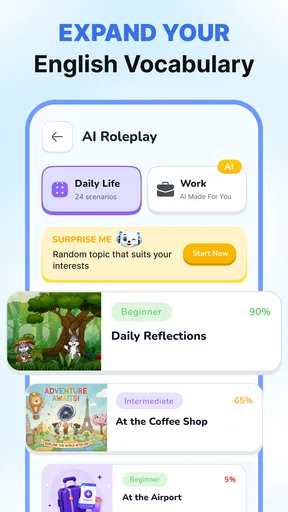
Compared with a traditional language course, it is more flexible and less comprehensive. A course gives you a planned route and often makes it obvious what to study next. Lurnia gives you freedom to choose a situation, which is helpful for travel or personal goals but can leave an unstructured learner jumping between topics.
Compared with a human tutor, Lurnia is more available and less socially intimidating. A tutor remains better at noticing motivation problems, explaining cultural context, and adapting a long-term plan. I would use the app between lessons, not as proof that lessons are unnecessary.
Compared with practising with a friend, the AI option is easier to repeat and less awkward when you make basic mistakes. A friend, however, can share authentic personal expressions and react with human nuance. The best combination is often to use Lurnia for repetition, then use real conversations to test whether the language transfers outside the app.
Cost, device support, and what the numbers suggest
Lurnia has passed the early-experiment stage in a meaningful way: it has more than a hundred thousand installs and holds a 4.9 average from 270 ratings. I would read that as encouraging evidence that the core experience is working for many users, while remembering that ratings cannot tell me whether the app matches a particular family’s learning style.
The free price makes trying it straightforward. The optional purchase range deserves more attention than the word “free,” especially on a shared phone or tablet. I would begin without paying, decide whether the conversation workflow actually becomes part of the household routine, and only then consider an upgrade. A feature is not good value if nobody uses it after the first enthusiastic week.
Android compatibility from version 7.0 onward also makes the app practical for older devices that a family may keep as a spare learning tablet. That can be useful when the main phone belongs to a parent or when several people need access at different times. I would still keep expectations realistic: an older device may be perfectly adequate for simple practice but less pleasant if switching between several users becomes cumbersome.
My household verdict
I recommend Lurnia for households that want an approachable way to practise speaking without arranging a lesson every time. Its best use is focused, repeatable conversation: choose one real situation, speak through it, notice a small number of corrections, and try again. That workflow gives the app a purpose beyond simply chatting with an AI.
I would introduce it to a family with three rules. Keep individual use clearly separated, protect purchase access, and treat feedback as guidance rather than unquestionable truth. For younger users, add a fourth rule: practise freely, but never share personal information in the conversation.
The key trade-off is flexibility versus structure. Lurnia is more engaging than memorizing phrases when the problem is fear of speaking, but it will not organize a complete language education for you. A learner who needs a syllabus should pair it with a course. A learner who already studies grammar but freezes in conversation may find it exactly the missing practice layer.
After using it, I see Lurnia as a useful shared-device option when the household coordinates expectations instead of pretending the app manages everyone automatically. Astronex has built the experience around immediate speaking and feedback, and that makes it easy to recommend for practical rehearsal. I would skip it only if you want a fully guided curriculum, human instruction, or a clearly managed family account system. For everyone else, starting with a few free, situation-based conversations is a sensible way to find out whether its AI practice earns a regular place in your routine.
Privacy and Permissions
See what permissions an app requests and how it handles your data.
- Microphone
- record audio
- Wi-Fi connection information
- view Wi-Fi connections
- Other
- view network connections, full network access, run at startup, control vibration, prevent device from sleeping, set an alarm, Google Play license check
Verdict
Strengths of Lurnia: AI Language Tutor
- AI conversations offer practical speaking practice anytime.
- Lessons adapt to different skill levels and learning goals.
- Instant feedback helps identify grammar and pronunciation mistakes.
- Short activities fit easily into daily study routines.
- Useful for learners who prefer private, self-paced practice.
Limitations of Lurnia: AI Language Tutor
- AI feedback may occasionally misunderstand context or accents.
- Advanced features may require a paid subscription.
- Some learners may miss interaction with real teachers.
- Progress can depend heavily on consistent daily practice.
- Data and voice recordings may raise privacy concerns for some users.
Other Releases by Astronex
View All
Mitu AI: Prank Video Generator
Art & Design4.7

Designest: AI Home Design
House & Home4.2
Similar Picks in This Category
View All
Duolingo: Language Lessons
Duolingo4.7

Google Classroom
Google LLC2.8

Unacademy: Learn & Crack Exams
Unacademy3.2

Bible App for Kids
Life.Church4.4

Cake - Learn English & Korean
Cake Corp.4.7

Brainly: AI Homework Helper
Brainly4.5
Frequently Asked Questions
What is Lurnia: Learn Language with AI?
Lurnia is a language-learning app that uses artificial intelligence to help users practice vocabulary, grammar, pronunciation, and everyday conversation. Instead of relying only on traditional lessons, it is designed to offer interactive exercises and personalized practice based on your progress. It can be useful for beginners and intermediate learners who want flexible study sessions on an Android or iOS device.
Which languages can I learn with Lurnia?
The languages available in Lurnia may depend on the current version of the app, your device, and the developer’s regional offering. Before downloading, check the official store listing to confirm that your target language is supported. It is also worth reviewing whether the app focuses on your preferred learning area, such as speaking, travel phrases, vocabulary, listening comprehension, or structured grammar practice.
Is Lurnia: Learn Language with AI free to use?
Lurnia may provide free access to some lessons or basic features while reserving additional content, advanced AI practice, progress tools, or unlimited usage for a subscription or in-app purchase. Pricing and trial conditions can change, so review the payment details shown in Google Play or the App Store before confirming. Also check renewal terms if you activate a recurring subscription.
Does Lurnia require an internet connection?
An internet connection is generally recommended because AI-based conversations, account synchronization, lesson updates, and some audio features may depend on online services. Certain learning materials might remain available offline, but offline functionality can vary by lesson and subscription plan. If you intend to study while traveling, test the app after disabling mobile data to see which features continue working without an active connection.
Is Lurnia suitable for complete beginners?
Lurnia can be suitable for beginners if you start with its introductory lessons and practice consistently, especially when learning common words, phrases, and basic sentence patterns. However, an AI tutor may not always explain every grammar point as clearly as a human teacher. Users with specific academic, professional, or exam goals should treat Lurnia as a practice companion rather than their only language-learning resource.
